
Univision Now: Live TV
Univision Communications Inc.Entertainment
3.610.38K Reviews
- Version
- Varies With Device
- Installs
- 5.00M
- Age Rating
- Teen
Screenshots
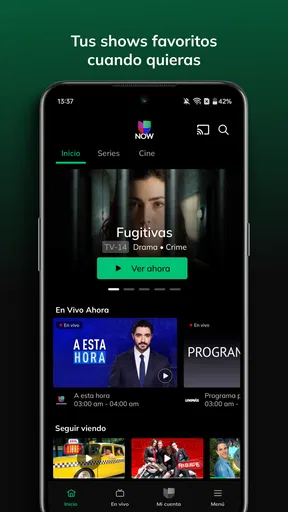
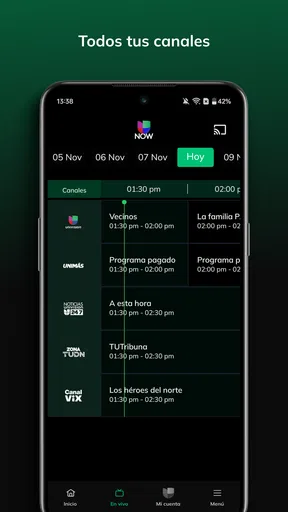
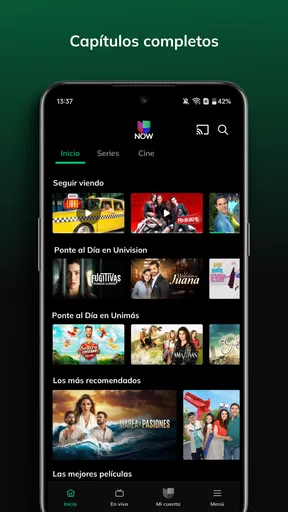
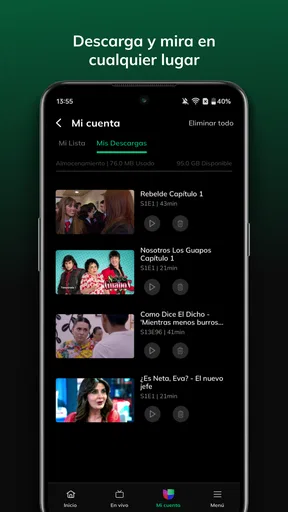
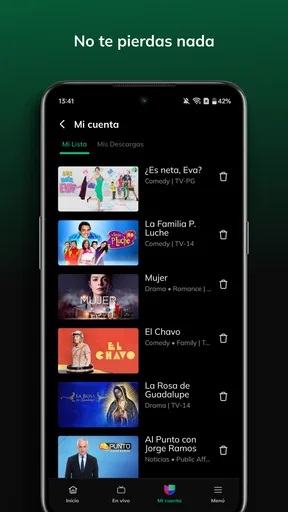
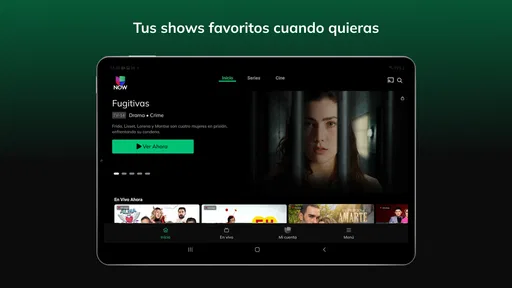
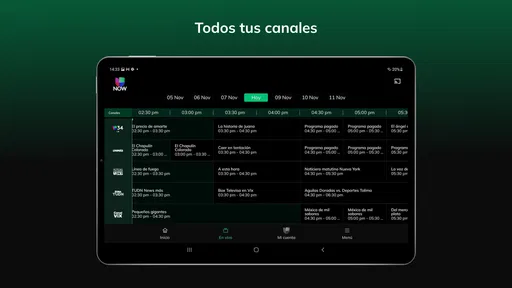
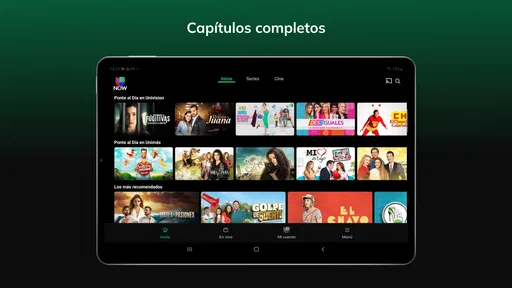
Our Review of Univision Now: Live TV
 Analysis by Appyee
I tend to judge a live-TV app by two practical questions: how quickly I can get to something worth watching, and what happens when I want to watch on a less-than-perfect connection. Univision Now is aimed at viewers who want Spanish-language programming from Univision and UniMás on a phone, rather than relying on a cable setup. That focus makes it easier to understand than a broad streaming service, but it also means the app makes the most sense when those channels are already part of your regular viewing life.
What to expect when you press play
For quick viewing, the useful distinction is between a live channel and a program you choose from the on-demand library. Live TV is a natural fit when you want to join a broadcast already in progress; on demand is more forgiving when your day does not line up with a show’s schedule. In either case, the experience depends on the internet connection, so I would not treat a strong-looking picture at home as a guarantee that it will behave the same way on a crowded public network.
Live streaming can be more sensitive to interruptions than watching a downloaded file, because the video has to keep arriving while you watch. If a stream pauses, I would first check whether other apps or devices are competing for the connection, then try again on a steadier network. That is a practical troubleshooting step, not a promise that every pause has the same cause. It also helps to avoid starting a live program at the exact moment you need to leave; an on-demand option, when available for that program, gives you more control over timing.
When viewing gets demanding
A short news check and a long evening of television place different demands on your routine. For a quick update, a phone is convenient and the app’s live channels can save the effort of finding a television. For a full episode or a long stretch of viewing, a larger screen is usually more comfortable, and a stable connection matters more because there is less patience for repeated pauses. If you are using mobile data, it is sensible to think about your plan before settling in for an extended session; streaming can use data, and the amount depends on viewing conditions.
Notifications can help you remember a program, but I would use them selectively. A reminder for a show you genuinely plan to watch is useful; alerts for everything quickly become noise. If your schedule changes, the on-demand library can make a missed broadcast less of a problem, although it is worth checking what is available for the particular program rather than assuming every live item will be there later.
Reliability and the limits of recovery
My view of reliability here is less about expecting a stream never to falter and more about whether the app suits the way you watch. If a live feed buffers at a tense point, that is especially frustrating because you cannot control the broadcast’s timing. Switching to a more dependable connection is the first sensible move; if you only need the program rather than the live moment, looking for it on demand may be a better workaround. Neither option removes the basic trade-off between immediate viewing and flexibility.
Signing in on another device can be convenient when you want to move from a phone to a tablet or TV, as the original experience describes. I would still treat a device change as a fresh viewing setup: check that you are signed into the intended account and that the new screen has a reliable connection before settling in. This avoids mistaking a login or network snag for a problem with the program itself.
Who benefits most from this setup
This app is best suited to someone who already seeks out Univision or UniMás and wants those channels close at hand. It is less compelling if you mainly watch English-language services, prefer a broad mix of unrelated networks, or only want occasional entertainment without a particular interest in Hispanic television. In those cases, a general streaming service or a traditional TV package may fit better than an app centered on these two channels.
Compared with ordinary on-demand platforms, the live channels are the key difference: they let you follow programming as it airs instead of choosing everything from a catalogue. Compared with cable, the phone-first convenience is the appeal, though it does not make a variable internet connection disappear. I would choose based on what matters more to you: access to these channels while away from a television, or the predictability and broader setup of the viewing options you already use.
In everyday use, I can picture checking a live broadcast during a lunch break, then returning to a program later if it appears in the on-demand library. For someone balancing work, family plans, and favorite shows, that combination can be more practical than planning the whole evening around a scheduled airing. The small but useful habit is to decide before pressing play whether you need the live moment or simply want the episode; that choice can prevent a rushed viewing session from becoming frustrating.
Diving into Univision Now
First things first, setting up Univision Now is a breeze. You just download the app, sign up, and BAM, you’re in! The app has a clean interface that makes it super easy to navigate. You’ll find a variety of live channels, including Univision and UniMás, right at your fingertips. It’s all about bringing that authentic Hispanic TV experience straight to your mobile device.
Features You’ll Love
One of the features that caught my eye is the ability to watch live TV. Whether you’re into telenovelas, news, or sports, this app has got you covered. There’s something so satisfying about watching your shows live, isn’t there? Plus, the video quality is pretty top-notch, assuming you’ve got a decent internet connection.
Another sweet feature is the on-demand library. Can’t catch your show live? No worries, just stream it later. The app offers a pretty extensive library of past episodes and specials. Perfect for those binge-watching sessions on a lazy Sunday.
The Little Things Matter
One thing I really appreciate about Univision Now is the ability to customize notifications. You can set reminders for upcoming shows, so you’ll never miss an episode of your favorite telenovela. It’s the little things that make a big difference, right?
And let’s not forget about the option to stream on multiple devices. So, if you’re watching on your phone and want to switch to your tablet or TV, it’s super seamless. Just log in, and you’re back to watching.
Room for Improvement
Now, no app is perfect, and Univision Now does have a couple of hiccups. For one, there are ads. Quite a few of them, to be honest. I get it, they need to make money, but it can be a bit much at times. And if you’re outside the US, you might run into some restrictions. It’s a bit of a bummer if you’re traveling and want to catch up on shows.
Also, while the app generally runs smoothly, there are occasional buffering issues. It’s not a deal-breaker, but it can be annoying, especially during a nail-biting moment in your favorite show.
How it fits into a real viewing routine
Where this app earns its place is in a household that follows Univision or UniMás but does not always have access to the main television. I might use it to keep up with a news broadcast while making breakfast, then save a drama for a quieter part of the evening. That is a more realistic fit than treating a phone as a full replacement for every kind of TV: the smaller screen is handy for catching a segment, but less comfortable for several hours of viewing.
It can also suit families or roommates with different schedules. One person can watch a live program on a mobile device while another uses the television for something else. The practical trade-off is that each viewer still needs a suitable screen and connection, and the app is most valuable when its particular channels are what someone wants to watch. If no one in the household follows them, the convenience alone is unlikely to justify adding another viewing habit.
Making the live and on-demand mix work
I would use live viewing for events where being part of the broadcast matters, and reserve on demand for catching up at my own pace. That simple split reduces the pressure to rearrange a day around a fixed schedule. It is also worth checking the library before assuming a missed show can be watched later: availability can differ by program, so the safer approach is to treat on demand as a useful option rather than a guaranteed replay of everything.
For a planned evening, I would open the app early enough to confirm that the program I want is accessible and that the connection is behaving. That small bit of preparation matters more for live viewing, where there is no convenient pause in the broadcast while you sort out a weak signal. If I am heading out, I would decide whether watching over mobile data makes sense for my plan instead of discovering the cost of a long session afterward.
Who should choose another option
The app is not the right answer for every viewer. If you need a large channel bundle, want a single service that covers many unrelated interests, or prefer watching without depending on internet quality, a cable setup or a broader streaming platform may be a better match. Likewise, frequent travelers should keep the stated out-of-US restrictions in mind; I would not rely on it as the only way to watch while abroad.
Ads are another real part of the experience, and they can interrupt the flow of a long session. If uninterrupted playback is your priority, that may weigh more heavily than the convenience of carrying live channels in your pocket. The app is a stronger choice when access to Univision and UniMás is the main goal and the viewer accepts the advertising and connection trade-offs that come with streaming.
Cost, age suitability, and device fit
The app is free to install, while in-app purchases are listed from $4.99 to $194.99 per item, so I would check the purchase details shown in the app before committing to anything. That range makes it especially important not to confuse free installation with a promise that every viewing option costs nothing. The app is rated Teen, which gives parents a useful starting point, though I would still consider the specific program rather than treating an age label as a substitute for checking its content.
It was released on November 17, 2015, and requires Android 6.0 or later. That minimum makes it available to a range of older Android devices, but the age of a phone alone does not tell you how smoothly it will stream. A device with limited capacity, a busy network, or several apps running may feel less responsive during video playback. I would close unused apps and use a dependable Wi-Fi connection for longer sessions, while remembering that those steps can help with general strain but cannot guarantee a perfect stream.
How to judge its value
Univision Now is an entertainment app from Univision Communications Inc. It has a 3.5 average from around 32,000 ratings, with roughly 10,000 written reviews and over 5 million installs. Those figures suggest it has reached a substantial audience, but they do not tell me whether it will perform well on your particular phone or network. I would treat them as context, then judge the app by whether its channels and viewing style match your routine.
My practical verdict is that it works best as a focused companion for people who already want Univision and UniMás, rather than as a universal replacement for television. Its strongest case is convenience: live viewing when you want to tune in now, plus an on-demand route when your schedule does not cooperate. Its weakest moments are the familiar streaming trade-offs—ads, possible buffering, and less certainty when you are away from a strong connection or traveling outside the US.
Wrapping It Up
So, would I recommend Univision Now? Absolutely, especially if you’re a fan of Hispanic TV. It’s convenient, easy to use, and packed with content that’ll keep you entertained. Sure, it has a few quirks, but what app doesn’t? Overall, it offers a solid viewing experience for those who want to stay connected to Hispanic culture through television.
If you’re curious, why not give it a try? Download the app, explore its features, and see how it fits into your viewing habits. You might just find it’s exactly what you’ve been looking for.
Verdict
Strengths of Univision Now: Live TV
- Wide variety of live channels available.
- User-friendly interface with easy navigation.
- High-quality streaming with minimal buffering.
- Catch-up feature for missed shows.
- Compatible with multiple devices.
Limitations of Univision Now: Live TV
- Limited content for non-Spanish speakers.
- Requires subscription for full access.
- Occasional ads even with a subscription.
- Some regional restrictions apply.
- No offline viewing option.
Other Releases by Univision Communications Inc.
View All
ViX: TV, Deportes y Noticias
Entertainment4.3

Univision Noticias
News & Magazines4.7
Similar Picks in This Category
View All
Google Play Games
Google LLC3.9

Netflix
Netflix, Inc.4.8

YouTube Kids
Google LLC4.2

Disney+
Disney4.4

Prime Video
Amazon Mobile LLC4.7

Steam
Valve Corporation3.2
Frequently Asked Questions
What is Univision Now and what can I watch on it?
Univision Now is a streaming service offering live and on-demand content from Univision and UniMás channels. Subscribers can enjoy a variety of Spanish-language programming, including telenovelas, news, sports, and entertainment shows. Additionally, Univision Now provides access to exclusive content and a vast library of past episodes.
Is a subscription required to access Univision Now?
Yes, Univision Now requires a subscription to access its full range of features. Users can choose from different subscription plans, which provide live streaming of Univision and UniMás, along with on-demand content. New users often have the option to start with a free trial period before committing to a plan.
Can I watch Univision Now on multiple devices simultaneously?
Univision Now allows users to stream content on multiple devices at the same time, but there may be a limit depending on the subscription plan. Typically, users can stream on two devices simultaneously, making it convenient for families or multi-user households. Always check your plan details for specific limits.
Is there a way to watch Univision Now offline?
Univision Now currently does not offer an offline viewing feature. All content is streamed live or on-demand, requiring a stable internet connection. While offline downloads are not available, users can access their favorite shows and live events from anywhere with internet access.
Are there parental controls available on Univision Now?
Univision Now provides parental controls to help manage what content is accessible to younger viewers. These controls allow parents to restrict access to certain shows or categories, ensuring children only view age-appropriate content. Users can easily set up and adjust these controls in the app settings.
